Why the brand apps stop at one brand
A paint maker's app exists to sell its paint, so it carries its own range: Sherwin-Williams' ColorSnap about 1,700 colors, Benjamin Moore's Color Portfolio its collections, the Dulux Visualiser the Dulux range. That makes them good once you have chosen a brand. But if your shortlist has a Benjamin Moore white, a Behr white and a Sherwin-Williams white, you end up switching between three apps and comparing screenshots, never seeing the three colors on one picture of your room.
How to compare brands on one photo
- Shortlist colors on each maker's website or fan deck.
- Find each color's HEX code. Behr shows it on the color's page; for Sherwin-Williams, take the RGB values and convert them. Our HEX code guide covers where to look.
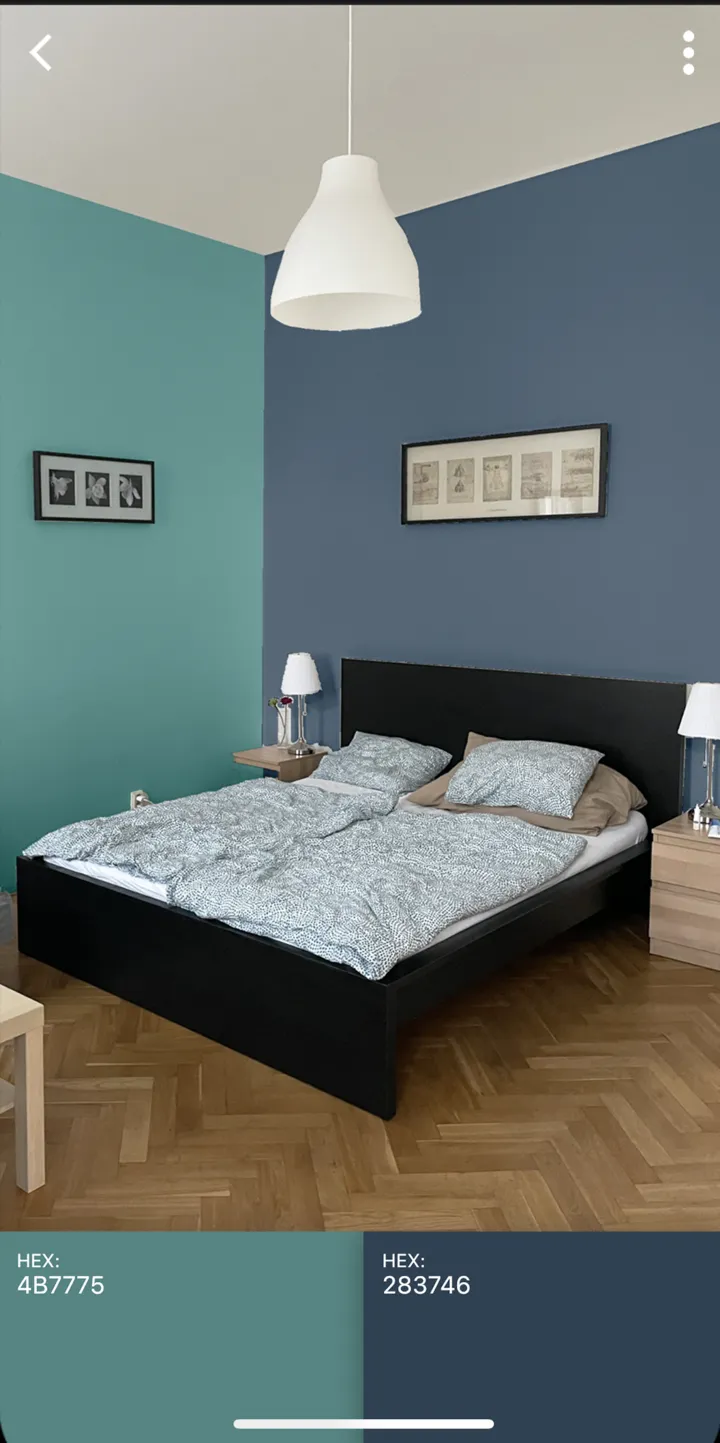
- In Paint my Room, open a photo of the room, select a color in the palette, choose Add HEX color from the menu and type the code. It replaces the selected color.
- Tap a wall. Select the next palette color, add the next code and tap the next wall.
- Choose Export image. The picture lists the HEX code of every color used, so you know which wall was which brand.
What a HEX code can and can't tell you
A HEX code is a color on a screen, the paint maker's digital version of its paint. That makes it good for what this method needs: comparing colors against each other on the same photo, in the same light. It can't show sheen, and the paint on your wall will look different in your room than any screen shows it. So use it to narrow the list, then buy samples from the brands that are left.
When a brand app is the better choice
Once you've settled on one brand, its app does things Paint my Room doesn't. It can match a color from a photo to its own range, several paint the wall live through the camera, and some order chips or testers to your door. Paint my Room's job is the step before that: seeing colors from different brands on your own walls, side by side.